

Table of Contents
- Quick Comparison: Best Tech Gadgets for International Travel
- Universal Travel Adapter with USB-C: One Charger for Every Country
- AI Language Translation Earbuds: Breaking the Language Barrier
- Travel Tech Organization Tips: Cable Management and Tech Organizers
- Photography and Content Creation Gear for International Travel
- Connectivity and Power: Staying Charged and Online Abroad
- Troubleshooting and Tech Support Abroad
- Conclusion: Building Your International Travel Tech Kit
- Frequently Asked Questions
Last Updated: September 21, 2026
Quick Comparison: Best Tech Gadgets for International Travel
The best tech gadgets for international travel solve specific problems: dead batteries, language barriers, tangled cables, and unreliable connections. This guide from ELTStores focuses on what actually earns space in your carry-on, from universal adapters to AI translation earbuds. The 3-in-1 AI Translation Earbuds from ELTStores, for example, handle 144 languages with up to 30 hours of total playtime.

| Gadget Category | Primary Problem Solved | Weight Range | Best For |
|---|---|---|---|
| Universal travel adapter with USB-C | Charging in any country | 100-200g | Every international trip |
| AI language translation earbuds | Language barriers | 50-80g | Non-English speaking destinations |
| Tech organizer pouch | Cable chaos | 150-300g | Multi-device travelers |
| Portable power bank | Dead batteries | 200-500g | Long travel days |
| Travel camera | Capturing memories | 300-800g | Content creators |
Universal Travel Adapter with USB-C: One Charger for Every Country
A universal travel adapter with USB-C is the single most important purchase for international travel, replacing a bag of country-specific plugs with one compact device.
Voltage Converters vs. Adapters: What You Actually Need
Check the label on your device. If it reads "100-240V," you need only an adapter. If it reads a single voltage like "120V," you need a converter. This one check prevents most fried electronics.
GaN Chargers and Multi-Device Charging
Gallium nitride chargers, known as GaN technology, run cooler and pack smaller than traditional chargers. A single GaN charger with multiple USB-C ports can power a laptop, phone, and earbuds at once. Look for USB-C Power Delivery for fast-charging capability across devices.
AI Language Translation Earbuds: Breaking the Language Barrier
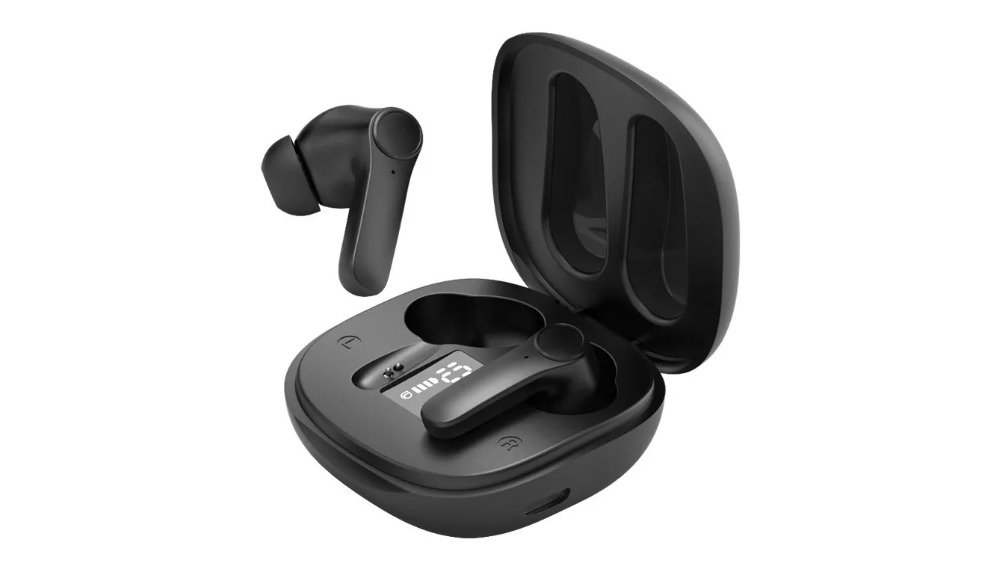
AI language translation earbuds translate speech in real time between two people speaking different languages, combining noise-canceling technology with AI-driven speech recognition.

Battery Life and Real-Time Translation Modes
A full day of back-to-back meetings demands a device that lasts. The 90mAh earbud battery paired with a 350mAh case means you charge once and forget it.
Choosing the Right Earbuds for Your Trip
For lighter trips, the Lingo Buds AI Translation Earbuds offer 144-language support in a compact design with USB-C fast charging and up to 5 hours per charge. The TWS Bluetooth Translation Headphones add touch control and a durable ABS build for everyday use.

| Model | Price | Battery Life | Languages | Best For |
|---|---|---|---|---|
| 3-in-1 AI Translation Earbuds | $143.25 | 8 hrs + 30 hrs case | 144 | Business travelers |
| Lingo Buds | $64.53 | Up to 5 hrs | 144 | Budget-conscious travelers |
| TWS Translation Headphones | $83.71 | Extended use | Multilingual | Everyday use |
Travel Tech Organization Tips: Cable Management and Tech Organizers
Travel tech organization is a weight-and-utility problem disguised as a tidiness problem. Every cable and pouch adds grams that compound across a multi-week trip, and every item you leave behind is a potential mid-trip purchase at airport prices. The goal is a kit where every item earns its weight.
The Weight-to-Utility Rule
Before any item goes in the bag, ask two questions: How much does it weigh, and what specific failure does it prevent? A 30g USB-C cable that charges your phone, earbuds, and power bank from one brick earns its weight; a second cable that only fits an old camera does not.
Packing a Tech Organizer Pouch
A tech organizer pouch with elastic loops and mesh pockets keeps cables, adapters, and earbuds tangle-free. Look for a water-resistant exterior, a YKK-style zipper, and enough depth to hold a power bank without bulging.
- Roll cables in loops, secure with velcro ties, rolling rather than folding extends cable life
- Store adapters in one dedicated compartment so you can find them in the dark
- Keep earbuds in their charging case, never loose
- Place the power bank in an accessible outer pocket for security screening
- Add a small microfiber cloth for screens and lens glass
- Include one spare USB-C cable and one spare charging brick, the two items most likely to fail
Cables and Connectors: The Minimum Viable Set
Most travelers overpack cables. A workable minimum set: one USB-C to USB-C cable (phone, laptop, earbuds, power bank), one USB-C to Lightning cable for iPhone or older Apple accessories, one USB-A to USB-C fallback for rental cars and hotel ports, and one short USB-C cable for power bank to phone, four cables totaling roughly 100-120g.
Weight, TSA Compliance, and Carry-On Rules
Power banks must go in carry-on, never checked luggage. Under TSA and FAA rules, lithium-ion batteries rated 100Wh or less can fly in carry-on without airline approval, batteries between 101Wh and 160Wh require airline approval, and anything above 160Wh is prohibited. A TSA-approved approach means batteries come out at the checkpoint, so pack them in an outer pocket you can open without unpacking everything else.
Durability and Repairability: Buying Once Instead of Every Trip
The cheapest travel tech is often the most expensive over time. Favor standard connectors, replaceable cables, and user-serviceable batteries.
3-in-1 AI Real-Time Language →
Photography and Content Creation Gear for International Travel
A dedicated travel camera still outperforms a phone for landscape and low-light shots. For content creators, the choice comes down to how much control you want.
Connectivity and Power: Staying Charged and Online Abroad
Staying charged and online abroad comes down to three decisions: how much battery capacity you carry, how you get data without roaming fees, and how much weight you will trade for both. Get these wrong and you either run flat mid-navigation or pay your carrier's international day-pass rate for two weeks straight.
Power Banks: Watt-Hours, Not Milliamp-Hours, Decide What You Can Fly With
Airlines and the TSA regulate lithium-ion batteries by watt-hours (Wh), not milliamp-hours (mAh). The conversion: Wh = (mAh ÷ 1000) × voltage. A 10,000mAh bank at 3.7V is 37Wh; a 20,000mAh bank is 74Wh; a 27,000mAh bank is roughly 100Wh. Under TSA and FAA rules, batteries rated 100Wh or less can go in carry-on without airline approval, batteries between 101Wh and 160Wh require airline approval, and anything above 160Wh is prohibited.
GaN Chargers: One Brick Instead of Four
Gallium nitride (GaN) chargers run cooler and pack smaller than silicon chargers of the same wattage. A single 65W GaN charger with two USB-C ports and one USB-A port can power a laptop, phone, and earbuds simultaneously, replacing three separate bricks. Look for USB-C Power Delivery (PD) and, for newer laptops, USB-C PD PPS support.
Getting Online Without Roaming Fees
You have three realistic options, depending on trip length and data appetite:
- eSIM data plans. Most modern unlocked phones support eSIM. You buy a data plan for the destination before you fly, install it as a second line, and turn off your home SIM's data roaming. Plans are typically sold in 1GB, 3GB, 5GB, 10GB, and unlimited tiers for fixed day counts. This is the cheapest option for most travelers and requires no physical SIM swap.
- Local physical SIM. Often the cheapest per-gigabyte rate, especially for stays over two weeks, but requires an unlocked phone, a trip to a carrier store or kiosk, and a passport for registration in many countries. You lose your home number while the local SIM is active unless your phone supports dual SIM.
- Portable Wi-Fi hotspot (MiFi). A pocket router that shares a local data connection over Wi-Fi to multiple devices. Useful for groups, laptops without eSIM, and rental-car navigation. Downsides: another device to charge (typically 3,000-5,000mAh internal battery, 8-12 hours of use), another deposit or rental fee, and a daily rate that adds up fast on long trips.
Backup Power for Rental Cars and Road Trips
For road trips and rental cars, a car phone holder with wireless charging keeps your phone mounted and topped up via Qi technology, fitting dashboards or air vents with built-in overheating protection. Pair it with a 12V USB-C car charger rated at 30W or higher for laptops or tablets.
Troubleshooting and Tech Support Abroad
Tech fails at the worst moments. A dead earbud, a frozen phone, or a charger that stops working can derail a meeting or a day of sightseeing.
Conclusion: Building Your International Travel Tech Kit
The right travel tech kit solves real problems, not collects gadgets. Language barriers, dead batteries, and tangled cables are the issues that actually slow you down.
Frequently Asked Questions
What are the most essential tech gadgets for international travel?
A universal travel adapter with USB-C, a portable power bank, noise-canceling earbuds, and a compact camera cover the basics. For language barriers, AI translation earbuds like the Lingo Buds support up to 144 languages. A tech organizer pouch keeps cables and adapters from tangling. Prioritize items that serve multiple purposes to save space and weight in your carry-on.
Do I need a universal power adapter for international travel?
Yes, if you are traveling outside your home country. A universal travel adapter with USB-C lets you plug into different outlet types without carrying multiple adapters. Check whether your destination uses 110-120V or 220-240V. Most modern electronics like phones and laptops handle both voltages, but hair dryers and some small appliances may need a voltage converter.
What is the best portable charger for long-haul flights?
Look for a power bank with at least 10,000mAh capacity and USB-C power delivery. That gives most phones two to three full charges. For long-haul flights, a 20,000mAh bank can keep your phone and earbuds topped up for the entire journey. Check that the capacity falls within TSA limits for carry-on luggage, which allows lithium-ion batteries under 100 watt-hours per battery.
Are noise-canceling headphones worth it for international travel?
Noise-canceling technology reduces engine noise and cabin chatter, which helps on long flights. It also improves speech recognition for translation earbuds in crowded areas. If you plan to use AI language translation earbuds, choose a model with built-in noise cancellation for clearer two-way conversations. The 3-in-1 AI Real-Time Language Translation Earbuds include noise-canceling technology for precise speech recognition.
What tech gadgets are allowed in carry-on luggage?
The TSA allows phones, laptops, tablets, cameras, earbuds, power banks, and most personal electronics in carry-on bags. Lithium-ion batteries must go in carry-on, not checked luggage. Power banks under 100 watt-hours are permitted without airline approval. Spare batteries should be individually protected to prevent short circuits. Always check your specific airline's rules before flying.