

Table of Contents
- What Sets Communication Buttons and Clickers Apart
- How Clicker Training for Dogs Works
- How to Teach a Dog to Use Talking Buttons
- Clicker Training vs Verbal Markers: Key Differences
- Pet Talking Buttons Examples and Real-World Use
- Making Your Choice: Training Goals and Suitability
- Frequently Asked Questions
Last Updated: October 6, 2026
What Sets Communication Buttons and Clickers Apart
When comparing communication buttons vs clickers, these are fundamentally different tools. A clicker is a mechanical device that produces a consistent, sharp sound, a marker signal telling your pet "that exact behavior earned you a reward." A communication button is a recordable device that plays back a custom word or phrase when pressed, letting your pet request something.

The clicker creates a marker signal, bridging the moment your pet performs the right action and when the reward arrives. Communication buttons skip that step: your pet presses the button, hears a recorded word like "outside" or "play," and you respond. Both rely on positive reinforcement and timing, but they operate in opposite directions.
How Clicker Training for Dogs Works
Clicker training uses a distinctive sound to mark the exact moment your dog performs the desired behavior. Dogs learn to associate that sound with an immediate reward, typically a treat or praise.
Clicker training rests on consistent marker signals and precise reward timing. Start with a quiet session where you click and immediately offer treats with no behavior required, so your dog learns the association.
The Marker Signal and Reward Timing
A marker signal is a distinct sound that tells your dog the exact moment they did something right. Timing is critical because dogs live in the present; wait two seconds and they may have already moved.
The reward should follow the click within one to two seconds. Keep high-value treats nearby, small pieces of chicken, cheese, or whatever motivates your dog most.
Teaching Your Pet to Associate Sound With Reward
Before using a clicker to train new behaviors, your dog needs to understand that the click predicts something good, "charging the clicker." Spend five to ten minutes in a quiet space clicking randomly and immediately giving treats.
After a few short sessions, your dog will start looking for treats the moment they hear the click. That's the sign the association is solid.
How to Teach a Dog to Use Talking Buttons
Talking buttons are recordable devices that play back a word or phrase when pressed. Unlike clicker training, which marks behavior you initiate, button training teaches your dog to initiate communication.
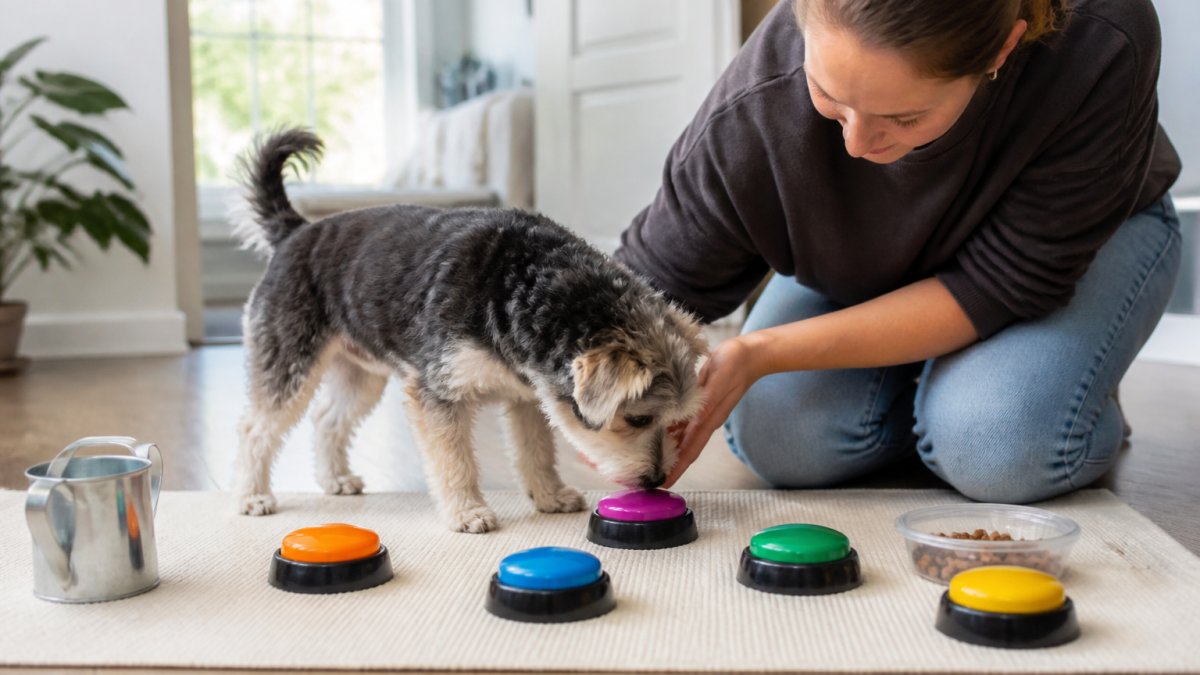
The foundation is the same as clicker training: association and reward. Your dog learns that pressing the button (or touching it with their nose) produces a sound, and that sound leads to something they want.
Recording and Setting Up Your First Button
Start with a single button. Choose a word that matches a common request, "outside," "play," "eat," or "help," and record your voice clearly and naturally. Keep the recording short, one to two seconds, since your dog will hear it repeatedly.
Place the button where your dog naturally spends time, near the door for "outside" or the food bowl for "eat," at a height they can easily touch with nose or paw.
Training Your Pet to Press and Request
Once your dog has pressed the button accidentally a few times, start actively rewarding presses. When your dog touches the button, immediately deliver what it represents: if it says "outside," open the door; if it says "play," initiate play.
Most dogs pick up the behavior quickly once they realize pressing the button gets results. Respond consistently: every press of "outside" means a trip outside, every press of "play" means play.
Clicker Training vs Verbal Markers: Key Differences
Many trainers use verbal markers instead of clickers, saying "yes" or "good" at the exact moment the dog performs the desired behavior. The debate centers on consistency and clarity: a clicker produces the exact same sound every time, while your voice changes with emotion, tone, and inflection.
4 Colors Pet Communication Button One-click Prevent Physical Inactivity →
Verbal markers work fine if used consistently and clearly, and their advantage is portability. Many trainers use both: a clicker in formal sessions and a verbal marker in real-world situations.
Pet Talking Buttons Examples and Real-World Use
Communication buttons have drawn wide attention as owners post videos of dogs and cats pressing recordable devices to request outdoor time, meals, or play.
The first button a pet learns is usually tied to a high-value, high-frequency need: a walk, a meal, or access to a favorite room. Once that association is solid, owners add a second and third button, spaced far enough apart that the pet can distinguish them by location as well as sound.
What Button Presses Can and Cannot Show
A button press is a learned operant behavior: the pet has associated a specific device with a specific outcome. That is real, useful communication, but not the same as language. When a dog presses "outside," the most defensible interpretation is that the dog has learned this button reliably produces outdoor access, not that it is forming a sentence about its intentions.
Several limits are worth keeping in mind:
- Selection and cuing. Owners often press the button themselves while teaching, so a pet may be responding to an owner's subtle movement, gaze, or proximity rather than initiating independently. A press that only happens when the owner is standing near the button is weaker evidence than one from across the room.
- Over-interpretation of sequences. When a pet presses two or three buttons in a row, owners frequently read a sentence into the combination. A more cautious reading is that each press is a separate request, and the order may reflect which outcome the pet wants most in that moment rather than grammar.
- Emotional labels. Buttons labeled "love," "happy," or "help" are the hardest to validate, because there is no clear, observable outcome the owner can deliver that confirms the pet meant that concept. Buttons tied to concrete, verifiable outcomes (outside, food, water, play) produce far more reliable learning.
- Reporting bias. The videos that circulate are the successes. Owners whose pets never take to buttons rarely post about it, so the apparent rate of complex communication in the popular record is almost certainly higher than what a typical household should expect.
Practical Real-World Setup
Real-world success depends on consistency and placement. A button works best when it sits in a location tied to the request, the reward is immediate and relevant, and every press gets a response. A button placed randomly with inconsistent follow-through teaches confusion. Owners who see the best results start with one button, respond reliably for several weeks, and only then add a second.
Making Your Choice: Training Goals and Suitability
Choosing between communication buttons vs clickers depends on what you are trying to accomplish, not which is "better."
Decision Guide by Training Goal
- You want to teach a new behavior or sharpen an existing one. Use a clicker. It marks the exact instant of the behavior, which is what makes shaping precise. This is the tool for sit, down, come, target, and trick chains.
- You want your pet to initiate requests or choices. Use a communication button. It gives the pet a way to ask for a walk, a meal, or play instead of barking, scratching the door, or pacing.
- You want to reduce a nuisance request behavior. A button can work as a replacement behavior, but only if you reliably honor the press. If you cannot commit to responding every time, a button will likely make the behavior worse, not better.
- You want both. Many owners run a clicker for formal training sessions and buttons for daily requests. The two do not compete; they operate in different modes.
Suitability and Welfare Check
Before buying either tool, run through these questions:
- Temperament. A clicker suits almost any pet because the owner controls the pace. Buttons require the pet to initiate and to tolerate some frustration while learning, so they tend to fit adult pets with basic impulse control better than young puppies or highly excitable pets.
- Mobility and anatomy. A pet with arthritis, a recent injury, or limited reach may struggle to press a floor button with a paw or nose. Look for a button with a light press force, or place it on a raised, stable surface. Flat, hard-to-press buttons are a common source of abandonment.
- Household setup. Buttons need a consistent location and a household that will respond the same way every time. In a busy home with multiple people, agree on the rules first, or the pet gets mixed signals.
- Frustration risk. If a pet presses a button and nothing happens, some pets escalate to barking or pawing. Plan for how you will respond when you cannot deliver the request (for example, a "later" or "all done" button) so the pet is not left without an answer.
- Noise sensitivity. A clicker's sharp sound startles some pets. If your pet flinches, a softer verbal marker or a quieter clicker may be a better fit.
Practical Cost and Maintenance
Clickers are the low-cost option. A basic clicker is a few dollars, needs no batteries, and lasts for years. The main ongoing cost is treats and your time.
Recordable communication buttons cost more per unit and add upkeep:
- Per-button cost. Individual recordable buttons generally run in the range of roughly ten to forty dollars each, depending on brand and features. A multi-button setup multiplies that quickly.
- Batteries. Most recordable buttons run on replaceable batteries, so budget for replacements and keep spares on hand. A dead button that stops responding can undo weeks of training.
- Recording and re-recording. You record each button in your own voice. If a recording is unclear or too long, you will re-record it, so keep clips short (one to two seconds) and consistent in tone.
- Durability. Buttons sit on the floor and take paw and nose hits. Look for a sturdy housing and a stable base that will not slide or tip. A button that moves when pressed is harder for a pet to learn.
- Surface and cleaning. Floor-level buttons collect hair and dust. Wipe them down periodically and check that debris has not jammed the press mechanism.
A Simple Rule of Thumb
If your goal is to teach your pet something, reach for the clicker. If your goal is to let your pet ask you for something, reach for a button. If you want both, introduce them one at a time so your pet isn't learning two new systems at once. A young dog learning basic obedience benefits from a clicker; an adult dog with established request behaviors may benefit more from a button that gives them an alternative to barking or scratching.
Frequently Asked Questions
What is the difference between pet communication buttons and clickers?
Clickers produce a consistent sound that marks the exact moment your pet performs the desired behavior, followed by a reward. Communication buttons are recordable devices your pet presses to make a word or phrase, functioning as a request tool rather than a training marker. Clickers train behavior; buttons let pets initiate communication. Both use positive reinforcement, but they serve different purposes in your training plan.
How do you teach a pet to use a communication button?
Start by recording a single word (like 'outside') on the button. Whenever your pet naturally performs that action, immediately press the button so they associate the sound with what they did. Reward them with a treat or praise. Gradually, your pet learns to press the button themselves to request that outcome. The 4 Colors Pet Communication Button ($33.48) uses simple long-press recording, making setup straightforward for most pet owners.
Do clickers actually work for dog training?
Yes. Clickers work because they provide a precise marker signal at the exact moment your dog performs the correct behavior, bridging the gap between the action and the reward. This timing clarity helps dogs learn faster than verbal praise alone. The consistency of the click sound cuts through distractions better than inconsistent human voices, making it especially effective for teaching new behaviors and complex commands.
Can cats learn to use pet communication buttons?
Yes. Cats can learn to press buttons and associate them with outcomes they want, though they typically require more patience and higher-value rewards than dogs. Cats respond well to buttons for requests like 'food,' 'play,' or 'open door' since these align with their natural motivations. Start with one button and use treats or access to favorite activities as reinforcement.